<?xml version="1.0" encoding="utf-8"?><feed xmlns="http://www.w3.org/2005/Atom" ><generator uri="https://jekyllrb.com/" version="4.4.1">Jekyll</generator><link href="https://jamesonzimmer.com/feed.xml" rel="self" type="application/atom+xml" /><link href="https://jamesonzimmer.com/" rel="alternate" type="text/html" /><updated>2026-02-25T05:36:14+00:00</updated><id>https://jamesonzimmer.com/feed.xml</id><title type="html">Jameson Zimmer</title><subtitle>Jameson Zimmer is a Growth Product Manager with a background in vertical search. American based in Vancouver, BC.</subtitle><entry><title type="html">How to Add FAQ Schema to Jekyll Pages With Liquid</title><link href="https://jamesonzimmer.com/faq-schema-jekyll-liquid/" rel="alternate" type="text/html" title="How to Add FAQ Schema to Jekyll Pages With Liquid" /><published>2020-10-30T00:00:00+00:00</published><updated>2020-10-30T00:00:00+00:00</updated><id>https://jamesonzimmer.com/jekyll-faq-schema-json</id><content type="html" xml:base="https://jamesonzimmer.com/faq-schema-jekyll-liquid/"><![CDATA[<p>FAQ schema is one of my favorite underutilized SERP features for SEO.</p>

<p>I wasn’t able to find an off-the-shelf solution for adding FAQ schema markup to Jekyll sites, but it’s quite simple to do so by updating your site templates.</p>

<p>My solution involves updating your site template(s) so that FAQ items can be entered as front matter in your posts, and output into JSON and HTML automatically.</p>

<p>Here are the details for all y’all copy-paste cowboys out there! 🤠</p>

<h2 id="1-add-script-tag-to-defaulthtml-layout-template">1. Add &lt;script&gt; tag to default.html layout template</h2>

<p>Pop open your <strong>_layouts</strong> folder and add this to the <strong>&lt;head&gt;</strong>. You can really add it anywhere but I like to put it directly before the closing <strong>&lt;/head&gt;</strong> tag:</p>

<div class="language-plaintext highlighter-rouge"><div class="highlight"><pre class="highlight"><code>
{% if page.faq %}&lt;script type="application/ld+json"&gt;{"@context":"https://schema.org","@type":"FAQPage","mainEntity":[{% for item in page.faq %}{"@type":"Question","name":"{{item.question}}","acceptedAnswer":{"@type":"Answer","text":"{{item.answer}}"}}{% if forloop.last == false %},{% else %}]}&lt;/script&gt;{% endif %}{% endfor %}{% endif %}

</code></pre></div></div>

<h2 id="2-add-html-output-to-the-layout-templates-as-needed">2. Add HTML output to the layout templates as needed</h2>
<p>Chances are, you have several layout templates for your website such as “post,” “page,” etc.</p>

<p>You’ll need to add the HTML output anywhere you want the FAQ schema to output on the page as HTML for your readers.</p>

<p>For all layouts that will have FAQ schema, go ahead and scroll down to the <strong>{{ content }}</strong> liquid block in your layout file and add this:</p>

<div class="language-plaintext highlighter-rouge"><div class="highlight"><pre class="highlight"><code>
{% if page.faq %}
{% include faq-schema-content.html %}
{% endif %}

</code></pre></div></div>

<p>Assuming the default Jekyll site structure with a default, post, and page layout, you’ll need to add this to your “post.html” and “page.html” layouts only. You <strong>don’t</strong> need to add it to the default.html file.</p>

<h2 id="3-add-the-faq-include-to-your-_includes-file">3. Add the FAQ include to your _includes file</h2>
<p>Next, go into your <strong>_includes</strong> directory and create a file called <strong>faq-schema-content.html</strong>, with the following contents:</p>

<div class="language-plaintext highlighter-rouge"><div class="highlight"><pre class="highlight"><code>
&lt;hr&gt;
&lt;h2&gt;Frequently Asked Questions&lt;/h2&gt;
{% for item in page.faq %}
&lt;h3&gt;{{item.question}}&lt;/h3&gt;
&lt;p&gt;{{item.answer}}&lt;/p&gt;
{% endfor %}

</code></pre></div></div>

<p>You may want to update this to pretty up your FAQ with accordion for each entry, some kind of CSS box around it… it’s up to you :)</p>

<h2 id="4-add-faqs-to-your-content-front-matter">4. Add FAQs to your content front matter</h2>
<p>Now that all that’s sorted, you should be able to add a “faq” item to your front matter and have the content output to HTML and JSON for your pages.</p>

<p>Here’s an example post with FAQ schema added to front matter:</p>

<div class="language-plaintext highlighter-rouge"><div class="highlight"><pre class="highlight"><code>
---
layout: post
title: "My Amazing Post"
faq: 
- question: "How do I add FAQ schema to my Jekyll site?"
  answer: "simply read Jameson's &lt;a href='https://jamesonzimmer.com/faq-schema-jekyll-liquid/'&gt;helpful blog post&lt;/a&gt; on the topic."
- question: "Why bother adding FAQ schema to my site?"
  answer: "Because it will double the size of your entry in the SERP for some queries, and help direct traffic to your most relevant pages."
---

</code></pre></div></div>

<p>It’s important to use double quotes for the input, so that you can include single quotes around link targets in the FAQ items without breaking parsing of the front matter.</p>

<p>See example above for what a link should look like.</p>

<h2 id="caveats">Caveats</h2>

<p>The main drawback of this solution is that you can’t access custom data in your site’s <strong>_data</strong> directory for FAQ items. If you need to do this, you’ll have to add the JSON and markdown/HTML to your post directly, so that you can call data using Liquid in the text.</p>

<p>You might also be able to solve for this case by using includes in a clever way, but at a certain point if probably makes more sense to just upgrade from an SSG or go to something like Gatsby that has better data support and customization…</p>

<h2 id="basics-of-using-faq-schema">Basics of using FAQ schema</h2>

<ul>
  <li><strong>Don’t</strong> use emojis. Using emojis to make your result look pretty or “verified” has been abused to the point that pages with emojis in FAQ schema are likely to be invalidated for the feature.</li>
  <li><strong>Do</strong> use markup and links. Adding links to your FAQ schema is totally legitimate and is a great way to direct people to the most relevant page on your site. For example, if someone searches “how to hire a plumber in LA” and your plumbing site post on “how to vet a plumbing service in LA” shows up, a FAQ schema item addressing “who are the most popular plumbers in LA” linking to your “best plumbers in Los Angeles” page would be helpful for the user intent. Adding a “how to get a quote for X” item to your company homepage would also be perfectly legitimate.</li>
</ul>

<h2 id="why-bother-with-faq-schema-for-jekyll-sites">Why bother with FAQ schema for Jekyll sites?</h2>

<p>Because it takes some effort to set up, few people outside highly competitive affiliate verticals will bother.</p>

<p>But once set up, it doubles your result size in Google search and makes it easier for the search audience to find links to relevant pages on your site or locate a specific .</p>

<p>I’ve also seen some great results from including highly reference-friendly material e.g. statistics and facts in schema, resulting in an increase of linked references.</p>

<p>That said, it’s not always worth bothering with. As you may notice, I haven’t bothered adding it to my personal site you’re reading right now — I only bother for higher-traffic projects.</p>

<h2 id="faq-schema-serp-appearance">FAQ schema SERP appearance</h2>

<p>Once in place, it’s up to Google to decide if your page should have the FAQ schema SERP feature. Generally it only shows if you’re in the top 10 results for a query, and don’t have another page feature such as the snippet.</p>

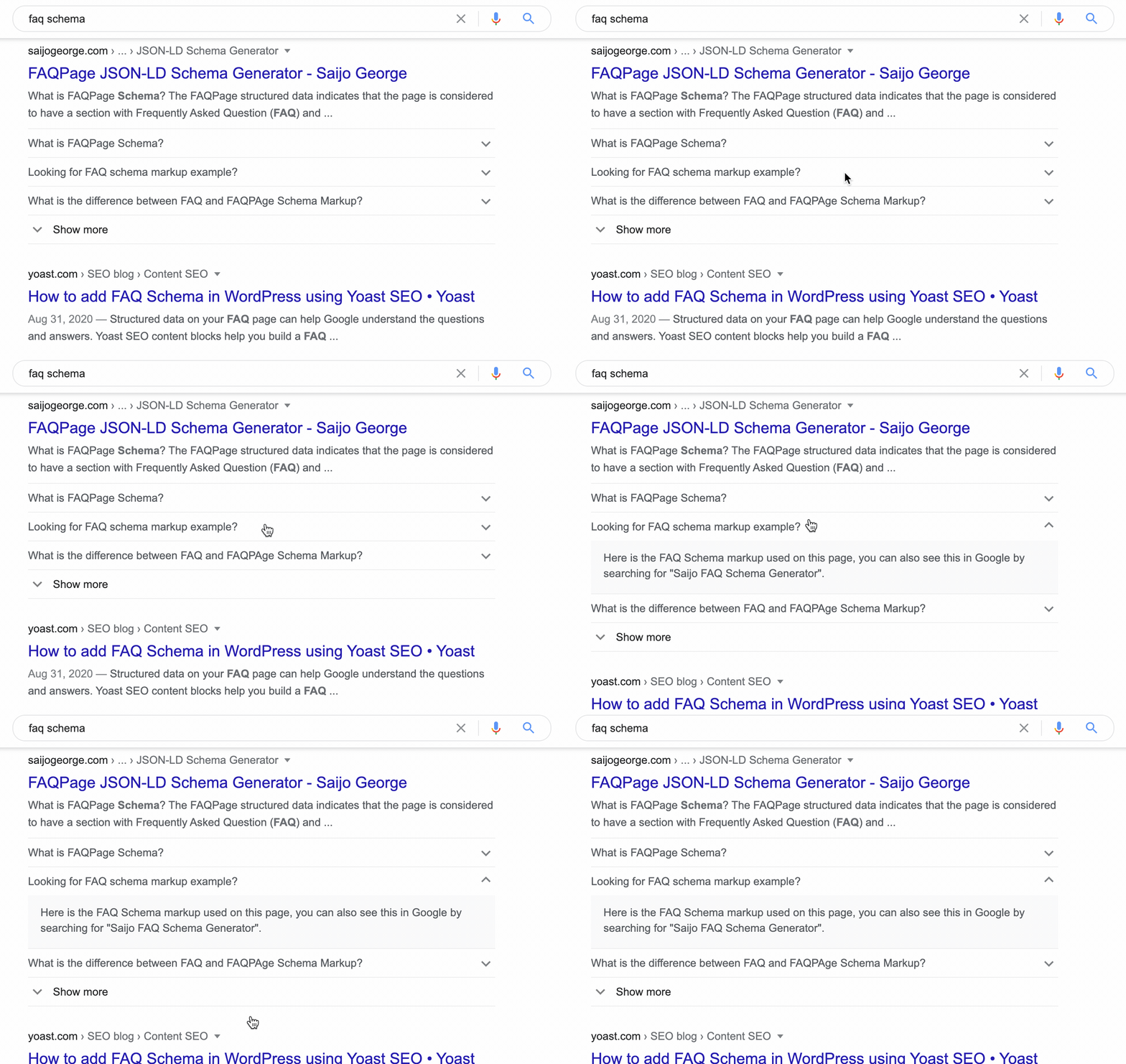
<p>Here’s a nice example from some guy who cheekily has FAQ schema on his post about FAQ schema:</p>

<p><img src="/assets/images/faq-schema-example.gif" alt="FAQ schema example" /></p>

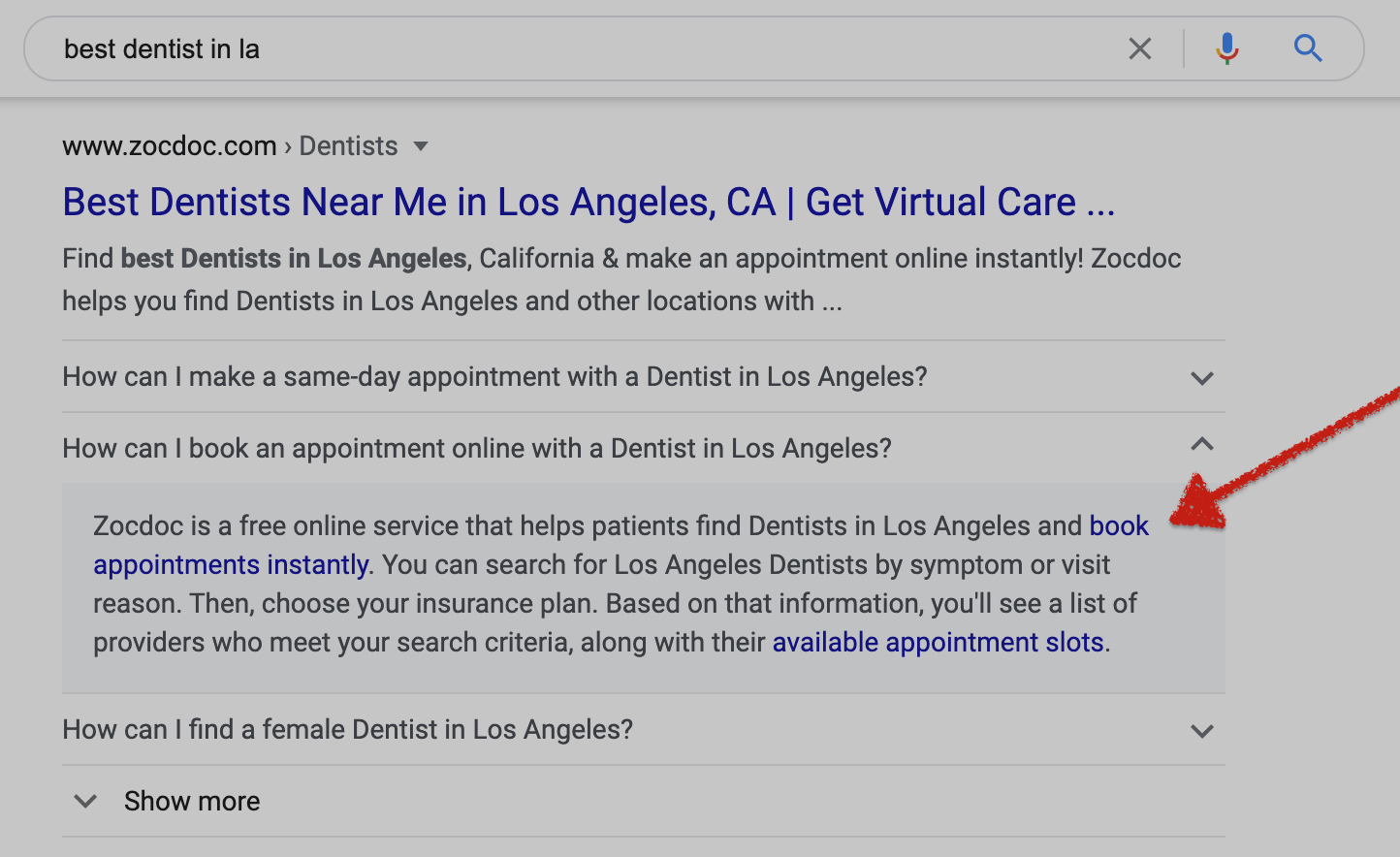
<p>Links are show as raw HTML when you lint the page, but will show up as functional and useful links when output in the SERP:</p>

<p><img src="/assets/images/links-in-faq-schema.png" alt="FAQ schema link example" /></p>

<p>You can also use HTML markup for bold, italics, headers, etc. to structure your result. However, I would caution against this since having a blog post embedded in the SERP is kind of a weird user experience, and likely to get demoted by the big G in the future.</p>

<p>I find that it’s best to use them for “quick tips” and facts, and give the reader a little tease about why they should read your post. Smash Digital has a <a href="https://smashdigital.com/faq-schema/">really good guide on CTR for FAQ schema</a>, if you want to read more on the topic.</p>

<hr />

<p><strong>As always, if you think there is a better way to do this, contact me at jameson [at] jamesonzimmer [dot] com and I’ll update the post if you’re correct!</strong></p>]]></content><author><name></name></author><category term="how-to" /></entry><entry><title type="html">Dynamic Footnotes in Markdown With Jekyll Without Plugins</title><link href="https://jamesonzimmer.com/dynamic-footnotes-markdown-jekyll-no-plugin/" rel="alternate" type="text/html" title="Dynamic Footnotes in Markdown With Jekyll Without Plugins" /><published>2020-06-12T00:00:00+00:00</published><updated>2020-06-12T00:00:00+00:00</updated><id>https://jamesonzimmer.com/jekyll-markdown-footnotes</id><content type="html" xml:base="https://jamesonzimmer.com/dynamic-footnotes-markdown-jekyll-no-plugin/"><![CDATA[<p>I recently was working on a project where I needed to produce dynamic footnotes in Jekyll blog posts.</p>

<p>There are some plugins floating around GitHub for this purpose, but I wanted to accomplish it with Liquid templating only if possible. So, this solution is Liquid-only and should work fine with GitHub Pages (which doesn’t allow Jekyll plugins at this time).</p>

<h2 id="goal-dynamic-footnotes-in-markdown">Goal: Dynamic Footnotes in Markdown</h2>
<p>My goal was to be able to type footnotes and references into my text, but without numbering them, so that I could move or add/remove citations without disrupting the numbering.</p>

<p>Basically, I wanted something like this:</p>

<div class="language-plaintext highlighter-rouge"><div class="highlight"><pre class="highlight"><code>Here is some text in a blog post. [^footnote]  
[^footnote]: Here is the footnote, with citation or commentary. 

Here is another sentence. [^footnote]  
[^footnote]: here is another footnote. 
</code></pre></div></div>

<p>Rather than the Markdown norm for footnotes, which looks like this:</p>

<div class="language-plaintext highlighter-rouge"><div class="highlight"><pre class="highlight"><code>Here is some text in a blog post. [^1]  
[^1]: Here is the footnote, with citation or commentary. 

Here is another sentence. [^2]  
[^2]: here is another footnote. 
</code></pre></div></div>

<p>…And have the output HTML still result in numbered footnotes like this:</p>

<div class="language-plaintext highlighter-rouge"><div class="highlight"><pre class="highlight"><code>&lt;p&gt;Here is some text in a blog post.&lt;sup id="fnref:1"&gt;&lt;a href="#fn:1" class="footnote"&gt;1&lt;/a&gt;&lt;/sup&gt;&lt;/p&gt;

&lt;p&gt;Here is another sentence.&lt;/p&gt;&lt;sup id="fnref:2"&gt;&lt;a href="#fn:2" class="footnote"&gt;2&lt;/a&gt;&lt;/sup&gt;&lt;/p&gt;

&lt;div class="footnotes"&gt;
  &lt;ol&gt;
    &lt;li id="fn:1"&gt;
      &lt;p&gt;Here is the footnote, with citation or commentary. &lt;a href="#fnref:1" class="reversefootnote"&gt;&amp;#8617;&lt;/a&gt;&lt;/p&gt;
    &lt;/li&gt;
    &lt;li id="fn:2"&gt;
      &lt;p&gt;here is another footnote. &lt;a href="#fnref:2" class="reversefootnote"&gt;&amp;#8617;&lt;/a&gt;&lt;/p&gt;
    &lt;/li&gt;
  &lt;/ol&gt;
&lt;/div&gt;
</code></pre></div></div>

<h2 id="solution-increment-counter-in-liquid">Solution: Increment Counter in Liquid</h2>
<p>The solution I came up with is to increment a counter in Liquid (template language used by Jekyll):</p>

<div class="language-plaintext highlighter-rouge"><div class="highlight"><pre class="highlight"><code>
&lt;!-- Define ref at top of post  --&gt;
{% assign ref = 1 %}

&lt;!-- Include counter with each reference --&gt;
Here is some text in a blog post. [^{{ref}}]  
[^{{ref}}]: Here is the footnote, with citation or commentary.  
{% assign ref = ref | plus:1 %}

Here is another sentence. [^{{ref}}]  
[^{{ref}}]: here is another footnote.  
{% assign ref = ref | plus:1 %}

</code></pre></div></div>

<p>This solution is a bit clunky, but works for me. I also like that it works for loops on data in my site, which is a regular use case for my project:</p>

<div class="language-plaintext highlighter-rouge"><div class="highlight"><pre class="highlight"><code>
&lt;!-- Define ref at top of post  --&gt;
{% assign ref = 1 %}

Some manually written text leading into a listicle based on CSV in the site.data file: 

&lt;!-- Include counter with each for loop --&gt;
{% for item in site.data.my-special-data %}
## {{ item.title }}  
{{ item.text }} {% if item.footnote %}[^{{ref}}]

[^{{ref}}]: {{item.footnote}}
{% assign ref = ref | plus:1 %}
{% endif %}
{% endfor %}

</code></pre></div></div>

<p>…and the counter just picks up again when you continue with manually written content after the Liquid loop on your data file(s).</p>

<h2 id="tell-me-the-better-way">Tell me the better way</h2>
<p>Anyway, I hope this solution is useful to folks like myself with limited development skills but a stubborn desire to use minimalist tools like Jekyll/GitHub Pages.</p>

<p><strong>If you’re reading this and you think this is a bad solution</strong>, please email me and tell me: jameson [at] jamesonzimmer [dot] com. I’ll update the page or just redirect if there is a better solution.</p>]]></content><author><name></name></author><category term="how-to" /></entry><entry><title type="html">Jekyll won’t build site due to error: invalid date in vendor</title><link href="https://jamesonzimmer.com/jekyll-invalid-date-error-bundler-exclude/" rel="alternate" type="text/html" title="Jekyll won’t build site due to error: invalid date in vendor" /><published>2020-05-01T00:00:00+00:00</published><updated>2020-05-01T00:00:00+00:00</updated><id>https://jamesonzimmer.com/jekyll-bundle-error-post-dates</id><content type="html" xml:base="https://jamesonzimmer.com/jekyll-invalid-date-error-bundler-exclude/"><![CDATA[<p>The frustrating thing about web development tools is that if you don’t touch a site for a long time, chances are you’ll find dependency issues when you come back to it.</p>

<p>In Jekyll, those dependency issues usually relate to <a href="https://jekyllrb.com/tutorials/using-jekyll-with-bundler/">Bundler</a>, the tool of choice for managing the gems, Ruby versions, and other “dependencies” needed to run your site.</p>

<p>If you’re reading this post, you probably are Googling a Terminal error related to “invalid date” for your Jekyll site… even though all the dates in your _posts folder appear to be properly structured. (<code class="language-plaintext highlighter-rouge">YYYY-MM-DD-title-of-post.md</code>.)</p>

<p>It probably looks something like this:</p>

<p>`
Error: could not read file [PATH TO YOUR PROJECT]/vendor/bundle/ruby/2.5.0/gems/jekyll-3.8.5/lib/site_template/_posts/0000-00-00-welcome-to-jekyll.markdown.erb: Invalid date ‘&lt;%= Time.now.strftime(‘%Y-%m-%d %H:%M:%S %z’) %&gt;’: Document ‘vendor/bundle/ruby/2.5.0/gems/jekyll-3.8.5/lib/site_template/_posts/0000-00-00-welcome-to-jekyll.markdown.erb’ does not have a valid date in the YAML front matter.
ERROR: YOUR SITE COULD NOT BE BUILT:
    ————————————
    Invalid date ‘&lt;%= Time.now.strftime(‘%Y-%m-%d %H:%M:%S %z’) %&gt;’: Document ‘vendor/bundle/ruby/2.5.0/gems/jekyll-3.8.5/lib/site_template/_posts/0000-00-00-welcome-to-jekyll.markdown.erb’ does not have a valid date in the YAML front matter.
                    `</p>

<p>You’re probably seeing this issue because your <code class="language-plaintext highlighter-rouge">vendor</code> folder is being included in your <code class="language-plaintext highlighter-rouge">_site</code> folder, which is the “production” folder for your website. Vendor is meant to be read by Jekyll, but is not meant to be shown to the public on your server. If the <code class="language-plaintext highlighter-rouge">vendor</code> folder is included, you are likely to see errors because Jekyll thinks you want the files included in <code class="language-plaintext highlighter-rouge">vendor</code> to be interpreted as production files.</p>

<p>Disclaimer: I am not a developer, and I use Jekyll as an amateur who just appreciates the simplicity of the tool. There are probably more elegant ways to address this error, which involve re-configuring your rbenv or Bundler setup.</p>

<p>However, the simplest way I’ve found to deal with this error is to simply <strong>exclude</strong> the vendor folder from my Jekyll build, which seems like good practice anyway since I can’t imagine why those files would be needed within the static assets I’m deploying with Netlify, AWS, GitHub Pages, or what have you.</p>

<h2 id="how-to-fix-invalid-date-jekyll-vendorbundleruby-issue">How to fix “invalid date” Jekyll vendor/bundle/ruby issue</h2>

<p>The solution is to “exclude” <code class="language-plaintext highlighter-rouge">vendor</code> folder from <code class="language-plaintext highlighter-rouge">_site</code></p>

<p>Inside your config file, search for the “exclude” line. There are a few ways to format it, but it probably looks like this:</p>

<p><img src="/assets/images/bundler-error.png" alt="Bundler image" /></p>

<p>Or like this:</p>

<p><img src="/assets/images/bundler-error-2.png" alt="Bundler image" /></p>

<p>Go ahead and exclude vendor like this:</p>

<p><code class="language-plaintext highlighter-rouge">exclude: 
	- vendor
</code></p>

<p>or:</p>

<p><code class="language-plaintext highlighter-rouge">exclude: ['vendor']</code></p>

<p>Note that if you have existing “excludes” in your Jekyll project (which is likely if you’re working off a theme you downloaded from somewhere), you need to <strong>add</strong> the <code class="language-plaintext highlighter-rouge">vendor</code> file to exlude list, not create a new <code class="language-plaintext highlighter-rouge">exclude</code> line within your config file.</p>]]></content><author><name></name></author><category term="how-to" /></entry><entry><title type="html">Practical Insights in The Marvelous Clouds: Towards a Philosophy of Elemental Media</title><link href="https://jamesonzimmer.com/the-marvelous-clouds-review/" rel="alternate" type="text/html" title="Practical Insights in The Marvelous Clouds: Towards a Philosophy of Elemental Media" /><published>2018-08-27T00:00:00+00:00</published><updated>2018-08-27T00:00:00+00:00</updated><id>https://jamesonzimmer.com/marvelous-clouds</id><content type="html" xml:base="https://jamesonzimmer.com/the-marvelous-clouds-review/"><![CDATA[<p><a href="https://www.press.uchicago.edu/ucp/books/book/chicago/M/bo20069392.html">The Marvelous Clouds</a> is billed as a philosophical work in the niche academic discipline of “media studies.” I’m not an academic, and the concepts of media studies are mostly above my head.</p>

<p>However, I found this book engaging because it had a fresh and helpful perspective on my field of work — digital content and search — that I would never get from results-obsessed and ethics-free industry publications.</p>

<p>This post will be less a review of the book and more a catalog of the parts I found relevant for understanding the practical side of search and digital media.</p>

<h2 id="elemental-media-and-search-engine-optimization">Elemental Media and Search Engine Optimization</h2>
<p>Peter’s description of the mechanisms underpinning Google’s search algorithm brings up a parallel between another problematic system of determining value: the academic publishing industry.</p>

<blockquote>
  <p>The reading logic of PageRank, which mimics the academic prestige system, is another way in which Google ties to campus culture. “Publish or perish” is the famous rule for university professors, but the calculus is actually more subtle. Professors love to read; and even more, they love to write. Even more than writing, they love to publish. But even more than publishing, they love to be read. Better than being read is being cited. Even better than being cited, however, is being cited by someone important. And how do you know who is important? By citations, of course: an important scholar gets cited a lot. Scholars who are cited by other scholars a lot confer greater authority when they cite another scholar: they channel the power of their inlinks.</p>
</blockquote>

<p>I hadn’t considered this parallel before. It’s a helpful tool for thinking about issues with search. How do you account for valuable content that isn’t heavily linked? How do you avoid rewarding sites/scholars who game the system, especially when the system is largely automated and rewards volume of engagement over accuracy?</p>

<p>Another gem that says volumes about the search industry:</p>

<blockquote>
  <p>The art of searching, like that of fire, consists largely in elimination.</p>
</blockquote>

<p>Peters is quick to compare digital archives to endless graveyards, less prone to considering them as living media.</p>

<p>Of course, the vast majority of content on the Internet is not valuable to anybody. There are reams of evidence showing how pages that fall below the top ten results are essentially archived — rarely read, and then only by niche researchers. To what degree is the volume of engaged content related to the value of the content, and to what degree is it defined by the “top ten” parameters of the Google search design?</p>

<p>Google has been testing infinite scroll results on mobile as of 2018, which could heavily impact the distribution of traffic in the top of the search results iceberg.</p>

<p>In practice, Google tends to prefer paginated content in their own UX as well as sites being ranked, since infinite scrolls are complex to catalog compared to neat, orderly books.</p>

<p>Ironically, Chrome manages the loading of infinitely scrolled content using a <a href="https://developers.google.com/web/updates/2016/07/infinite-scroller">technique called “tombstones”</a>.</p>

<h2 id="culture-shaping-media-media-shaping-culture">Culture shaping media, media shaping culture</h2>
<p>Peters presents a Borgesian “map and territory” dilemma throughout the book, made particularly clear in the sections on digital media and search:</p>

<blockquote>
  <p>[T]he aim [of PageRank] is not to know every square inch of soil but to figure out topography from the water flows. More simply, the content of documents can be inferred from their location in networks.</p>
</blockquote>

<p>Engaging with digital media, people and algorithms alike are faced with the challenge of prioritizing information in a “library of Babel” of our own making.</p>

<blockquote>
  <p>How long is the coast of England? The answer to this last question famously depends on the length of the measuring stick: the shorter the stick, the more it can account for small squiggles of shape, and thus longer the measured length.</p>
</blockquote>

<p>The more accurate the map, the more the map “becomes” the territory. But really, the representation and abstraction of the real thing is all that’s available to our comprehension — as well as the comprehension of human-designed algorithms.</p>

<h2 id="visions-of-the-internet">Visions of the Internet</h2>
<p>At one point in the book, Peters describes the three “visions” of digital media proposed by the major FANG companies:</p>

<ul>
  <li><strong>Google</strong>: open field to be surveyed</li>
  <li><strong>Facebook</strong>: beehive</li>
  <li><strong>Apple</strong>: walled garden</li>
</ul>

<blockquote>
  <p>[Google] sees the Internet as an open field to be surveyed rather than as either a social hive or a walled garden (the rival visions of Facebook and Apple).</p>
</blockquote>

<h2 id="internet-as-environment">Internet as environment</h2>

<p>The point of The Marvelous Clouds, to the degree that points are possible in academic books of philosophy, is that <em>media is an environment.</em> Like an environment, it is as much shaped as a shaper of those that inhabit it.</p>

<p>Peters suggests that the Internet isn’t really that special — it’s just an extension of existing modes of understanding the world. It suffers from the same issues as traditional media and environments. It is only revolutionary in that it allows for bigger graveyards and magnified bias.</p>

<p>By extension, search and our systems for cataloging a system are unlikely to rise above existing limitations to understanding and organization.</p>]]></content><author><name></name></author><summary type="html"><![CDATA[Insights from reading The Marvelous Clouds: Towards a Philosophy of Elemental Media.]]></summary></entry><entry><title type="html">Don’t delete your social media. Just change these three settings.</title><link href="https://jamesonzimmer.com/ten-arguments-social-media-lanier-reaction/" rel="alternate" type="text/html" title="Don’t delete your social media. Just change these three settings." /><published>2018-08-27T00:00:00+00:00</published><updated>2018-08-27T00:00:00+00:00</updated><id>https://jamesonzimmer.com/delete-social-media</id><content type="html" xml:base="https://jamesonzimmer.com/ten-arguments-social-media-lanier-reaction/"><![CDATA[<p>I just finished reading Lanier’s “10 reasons to delete your social media accounts right now.” (It inspired my own cheeky clickbait title for this article.) Anyway, he’s right — social media is awful, and we should all log off. </p>

<p>Unfortunately, it’s not that simple, and this sort of “cold turkey” advice tends to come from wealthy, well-positioned older people who can afford to forego the clear social advantages of networking on social media platforms. </p>

<p>Speaking personally, I’ve used Facebook to find multiple apartments that were cheaper and better suited to me than I could have found on craigslist or through paper ads. Looking at creative fields, it’s hard for an artist to skip out on Instagram and all the potential fans. </p>

<p>The problem, of course, comes when the tool stops being used for practical gain and starts being used as a time waster. 
To respond, I wanted to share a lighter, more realistic alternative. Take action on these three simple changes to your accounts, and you can have 80% of the mental benefits with 20% of the practical sacrifice. </p>

<ol>
  <li>Set all feeds to chronological order. If the platform you’re using doesn’t offer chronological order, consider deleting it. </li>
  <li>Block feeds, unless reading and reacting to every post by your social group is essential to your finances or wellbeing. </li>
  <li>If you’re using a social platform for personal gain, be strategic about it. For example, I mainly keep Facebook because I occasionally find it useful to ask my social group for leads on practical matters. (Finding apartment, who can sell me a used bike, etc.) To make sure my posts get maximum exposure, I post something I know will get comments every few months so that the Facebook algorithm will see all the engagements on my sporadic posts, and assign my less interesting “who can loan me x” posts more value and exposure. </li>
</ol>

<h3 id="one-more-interesting-point-from-the-book-worth-remembering">One more interesting point from the book worth remembering: </h3>

<p>Lanier claims that AI is being oversold, describing the hype as “AI storytelling.” I can’t speak to the truth of this from experience, but I can point out that even Google’s notoriously secretive and advanced search algorithm relies on armies of (presumably low-paid) search evaluators to make more nuanced decisions about who deserves the coveted top ten spots, following a <a href="https://static.googleusercontent.com/media/www.google.com/en//insidesearch/howsearchworks/assets/searchqualityevaluatorguidelines.pdf">decidedly analog bible of guidelines</a> that seems built to print out and plunk on a cubicle desk.</p>]]></content><author><name>Jaron Lanier</name></author><summary type="html"><![CDATA[Takaways from and reactions to the book '10 Reasons to Delete Your Social Media Accounts Right Now' by Jaron Lanier.]]></summary></entry><entry><title type="html">How to Configure Namecheap DNS for Custom Fastmail Email Address</title><link href="https://jamesonzimmer.com/namecheap-fastmail-mx-custom-domain/" rel="alternate" type="text/html" title="How to Configure Namecheap DNS for Custom Fastmail Email Address" /><published>2018-08-27T00:00:00+00:00</published><updated>2018-08-27T00:00:00+00:00</updated><id>https://jamesonzimmer.com/fastmail-namecheap-mx-custom-domain</id><content type="html" xml:base="https://jamesonzimmer.com/namecheap-fastmail-mx-custom-domain/"><![CDATA[<p>Here are instructions on how to set up a Fastmail email address at a custom domain hosted by Namecheap (myname@mywebsite.com). I found the instructions for setting up custom MX records on the Fastmail website had some missing information for Namecheap hosted domains. (See <a href="https://www.fastmail.com/help/receive/domains-setup-mxonly.html">Fastmail instructions for Namecheap DNS</a> here.)</p>

<p>I’m not deeply familiar with how DNS settings work, and this is probably the case for many people migrating away from Gmail surveillance to a more private email setup. Eventually I figured it out, so I figured I should post my findings for other people who, like myself, aren’t deeply familiar with the nuts and bolts of DNS and just want to follow a step-by-step setup.</p>

<p><em>Note that these instructions are for Namecheap-hosted domains for Fastmail email service only. Fastmail already has setup options for Google Suite and Zoho email addresses at custom domains that are documented well on their site. These instructions are only for nameservers hosted with Namecheap, which requires you to point MX records to FastMail.</em></p>

<ol>
  <li>Add your custom domain in the Fastmail domain settings.</li>
  <li>Configure Namecheap DNS for your custom domain.</li>
  <li>Check that Fastmail domain settings for confirmation that everything is set up properly.</li>
</ol>

<h2 id="add-your-custom-domain-in-the-fastmail-domain-settings">Add your custom domain in the Fastmail domain settings</h2>
<p>Mail &gt; Settings &gt; Domains.</p>

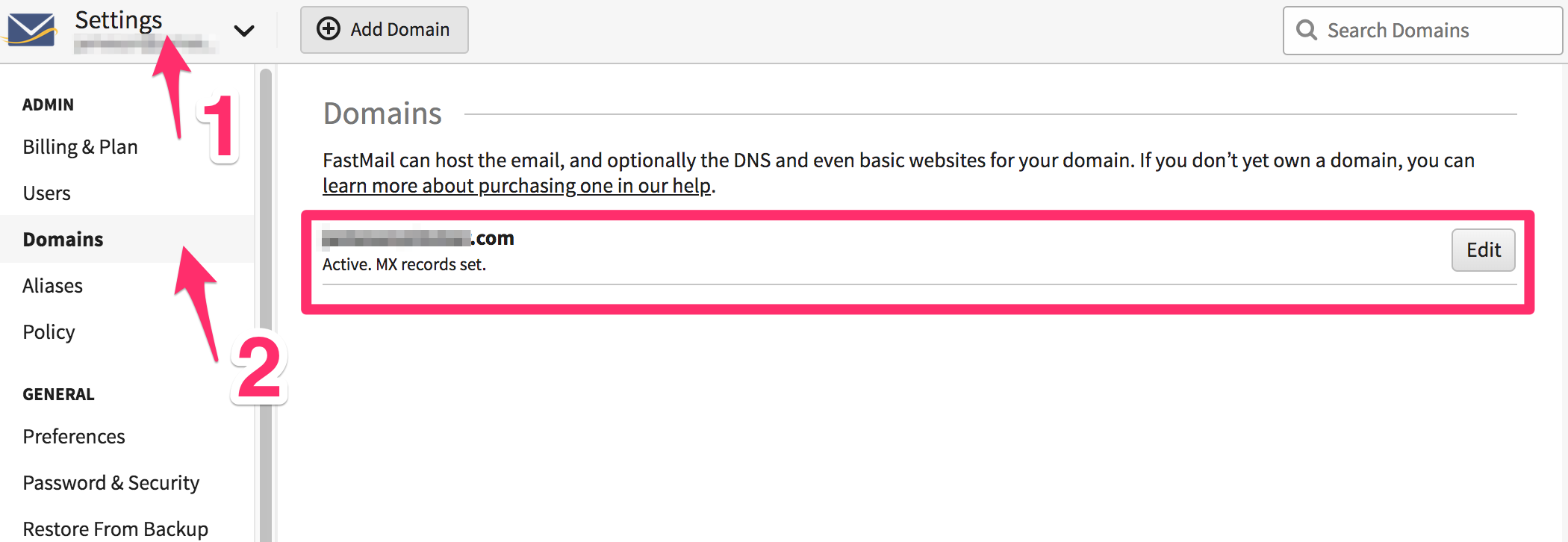
<p>If you signed up for Fastmail with a custom domain, this should already be entered automatically. I will look like this (except without the “MX records set” text.):</p>

<p><img src="/assets/images/screenshots-namecheap/fastmail-settings-domains.png" alt="Fastmail screenshot" /></p>

<p>If your custom domain is not automatically entered, simply click the “Add Domain” button and enter your custom domain like this:</p>

<div class="language-plaintext highlighter-rouge"><div class="highlight"><pre class="highlight"><code>yourdomain.com
</code></pre></div></div>

<h2 id="configure-namecheap-dns-for-your-custom-domain">Configure Namecheap DNS for your custom domain.</h2>
<p>There are two steps to the process of configuring your DNS records in the Namecheap dashboard for Fastmail.</p>

<ol>
  <li>Set MX records for domain</li>
  <li>Set Host records for domain</li>
</ol>

<p>Both of these DNS settings can be found in the “advanced DNS” section when managing your Namecheap domains.</p>

<h3 id="setting-up-mx-records">Setting up MX records</h3>
<p>Sign into your Namecheap account and navigate to the “Advanced DNS” settings for you domain:</p>

<p>Domain List &gt; yourdomain.com MANAGE button &gt; Advanced DNS</p>

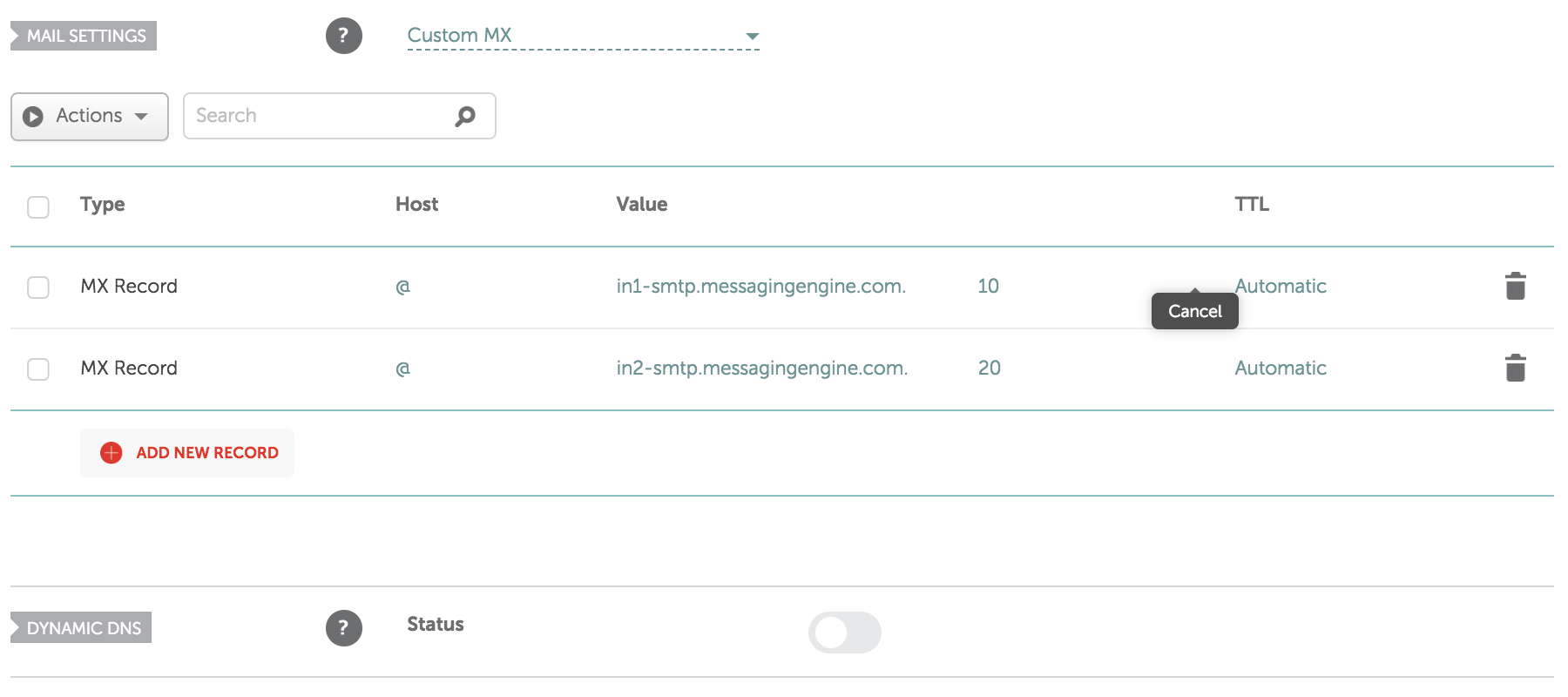
<p>Scroll down the page and you’ll see a “Mail Settings” section. Click the dropdown menu and select “Custom MX.” (Highlighted in screenshot below.)</p>

<p>Here are the entries you will need to add:</p>

<table>
<thead><tr><th>Type</th><th>Host</th><th>Value</th><th>&nbsp;</th><th>TTL</th></tr></thead><tbody>
 <tr><td>MX Record</td><td>@</td><td>in1-smtp.messagingengine.com.</td><td>10</td><td>Automatic</td></tr>
 <tr><td>MX Record</td><td>@</td><td>in2-smtp.messagingengine.com.</td><td>20</td><td>Automatic</td></tr>
</tbody></table>

<p><em>Note that the <code class="language-plaintext highlighter-rouge">.</code> at the end of the value entries is required, but Namecheap will add it automatically if you don’t add period at the end.</em></p>

<p>When you have set this up properly, it should look exactly like this:</p>

<p><img src="/assets/images/screenshots-namecheap/mail-settings-fastmail-namecheap.png" alt="Fastmail screenshot" /></p>

<h3 id="setting-up-host-records">Setting up Host records</h3>
<p>Fastmail <em>will</em> work with only MX records set. <em>However</em>, they recommend setting up <strong>SPF</strong> and <strong>DKIM</strong> as well to ensure your emails send properly and are not marked as spam.</p>

<p>Without getting too technical, here are the reasons why you should bother with this step:</p>

<ul>
  <li><strong>SPF</strong>: <a href="https://en.wikipedia.org/wiki/Sender_Policy_Framework">SPF (Sender Policy Framework)</a> was a method of preventing email spoofing that never really worked that well. Unfortunately, some email clients see SPF failures as a sign of spam. Basically, you should set SPF so that other email clients don’t interpret your emails as spam and send them to the spam folder.</li>
  <li><strong>DKIM</strong>: <a href="https://en.wikipedia.org/wiki/DomainKeys_Identified_Mail">DKIM (Domainkeys Identified Email)</a> is a way of associating or “signing” your email with your domain rather than the generic “messagingingine.com” domain. If you don’t set up DKIM, emails you send to Gmail addresses will display a “sent via messagingenging.com” warning next to your email that makes it appear suspicious.</li>
</ul>

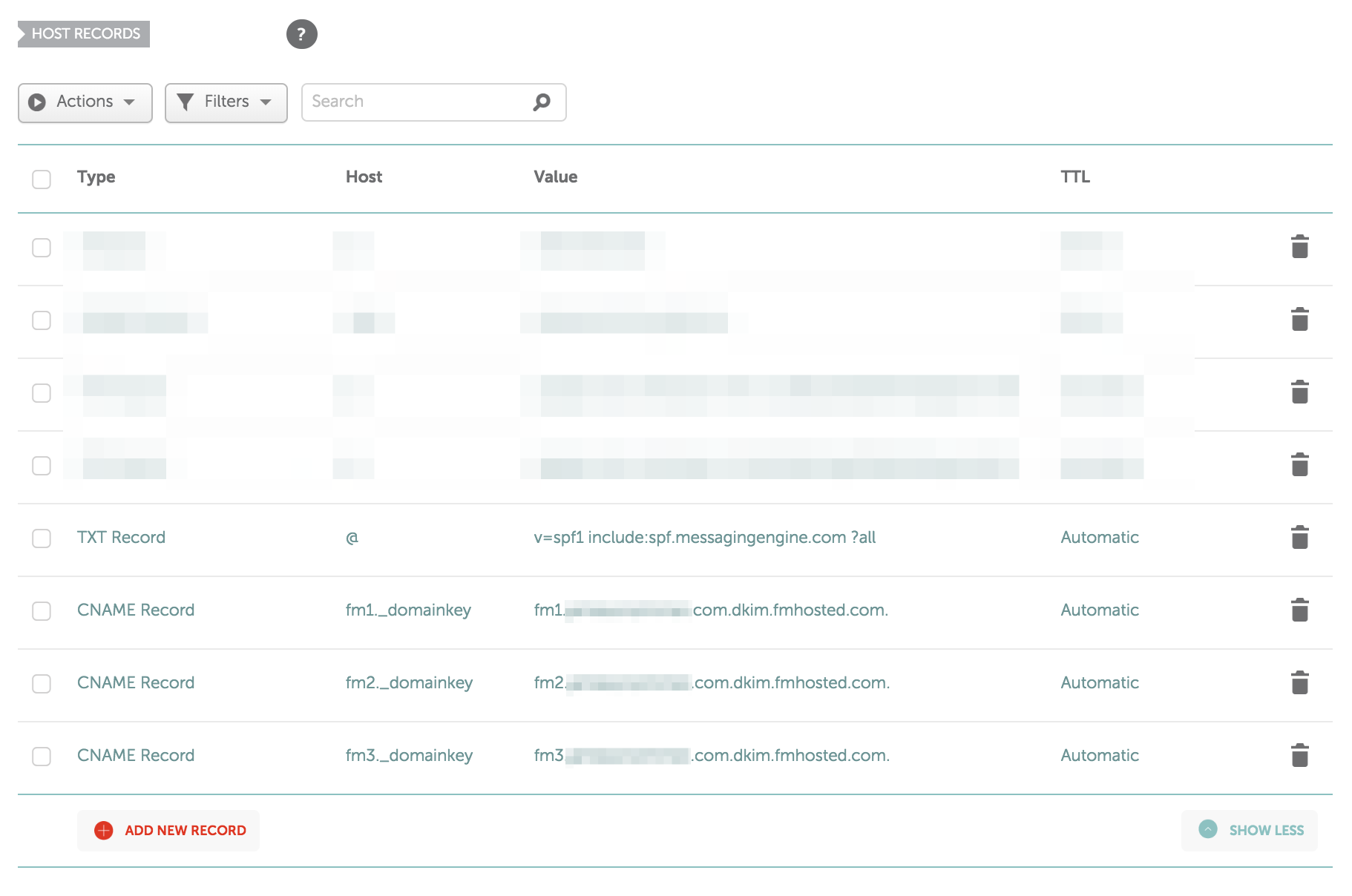
<p>To set these up, you’ll need to add the following records to the “Host Records” section of your Namecheap “Advanced DNS” area (<strong>Replace “yourdomain.com” with your domain</strong>):</p>

<table>
<thead><tr><th>Type</th><th>Host</th><th>Value</th><th>TTL</th></tr></thead><tbody>
 <tr><td>TXT Record</td><td>@</td><td>v=spf1 include:spf.messagingengine.com ?all</td><td>Automatic</td></tr>
 <tr><td>CNAME Record</td><td>fm1._domainkey</td><td>fm1.yourdomain.com.dkim.fmhosted.com.</td><td>Automatic</td></tr>
 <tr><td>CNAME Record</td><td>fm2._domainkey</td><td>fm2.yourdomain.com.dkim.fmhosted.com.</td><td>Automatic</td></tr>
 <tr><td>CNAME Record</td><td>fm3._domainkey</td><td>fm3.yourdomain.dkim.fmhosted.com.</td><td>Automatic</td></tr>
</tbody></table>

<p>When finished, it should look something like this:</p>

<p><img src="/assets/images/screenshots-namecheap/host-records-namecheap-fastmail.png" alt="Fastmail screenshot" /></p>

<h2 id="check-everything-is-working">Check everything is working</h2>
<p>Finally, the last step is to make sure Fastmail is seeing your DNS updates and confirm everything is working as intended.</p>

<p>Settings &gt; Domains &gt; Edit</p>

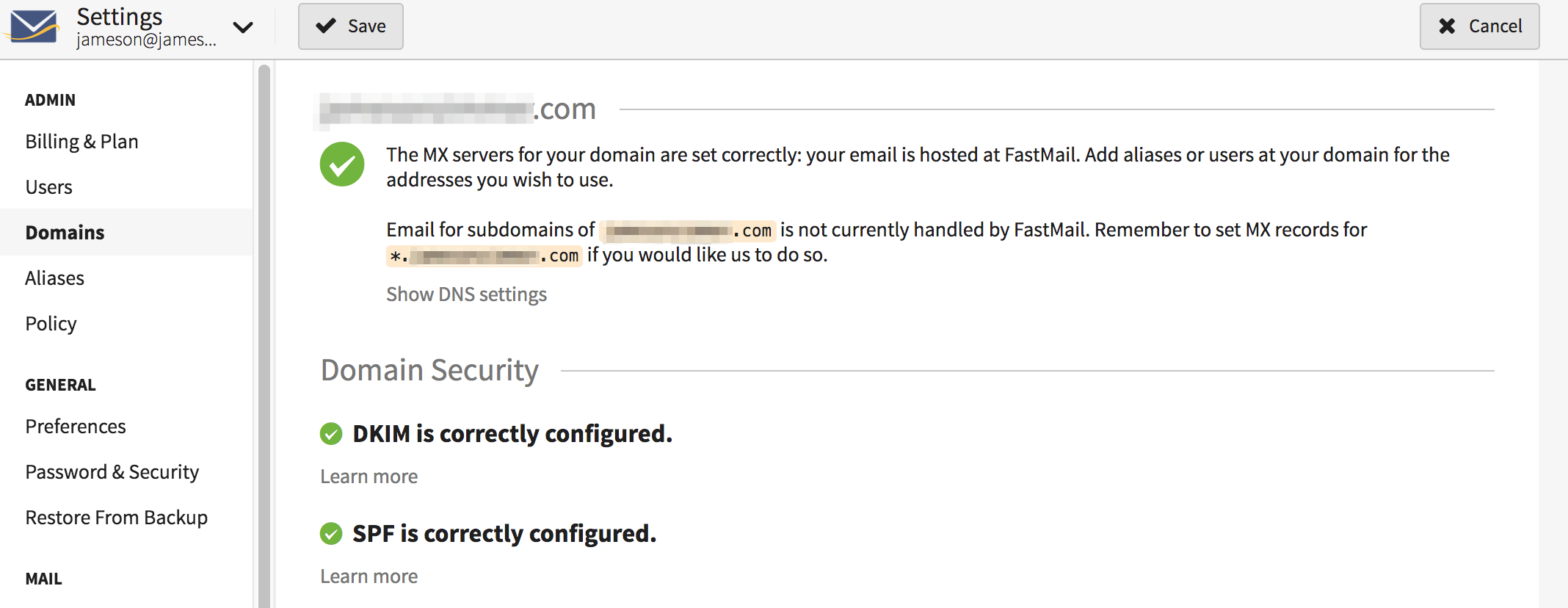
<p>You should see three big green checkmarks for each of the items you just completed:</p>

<p><img src="/assets/images/screenshots-namecheap/fastmail-mx-success.png" alt="Fastmail screenshot" /></p>

<p>Within a few minutes (up to a few hours in some cases) you should be able to send and receive emails with any other address, and your emails should display in recipient inboxes with no flags or warnings. In my case, everything was working within ten minutes.</p>

<p>Feel free to send an email to me at jameson@jamesonzimmer.com if you want to test your new Fastmail/Namecheap address!</p>]]></content><author><name></name></author><category term="how-to" /><summary type="html"><![CDATA[Instructions and screenshots showing how to configure a custom Fastmail domain with Namecheap DNS.]]></summary></entry><entry><title type="html">How to Make Ulysses Look Like iA Writer</title><link href="https://jamesonzimmer.com/ulysses-ia-writer-duospace-aesthetics/" rel="alternate" type="text/html" title="How to Make Ulysses Look Like iA Writer" /><published>2018-08-27T00:00:00+00:00</published><updated>2018-08-27T00:00:00+00:00</updated><id>https://jamesonzimmer.com/ia-writer-duospace-ulysses</id><content type="html" xml:base="https://jamesonzimmer.com/ulysses-ia-writer-duospace-aesthetics/"><![CDATA[<p>iA writer’s fonts are arguably the best part of iA Writer. However, I usually use Ulysses App for composition since I find the customization and file system more practical.</p>

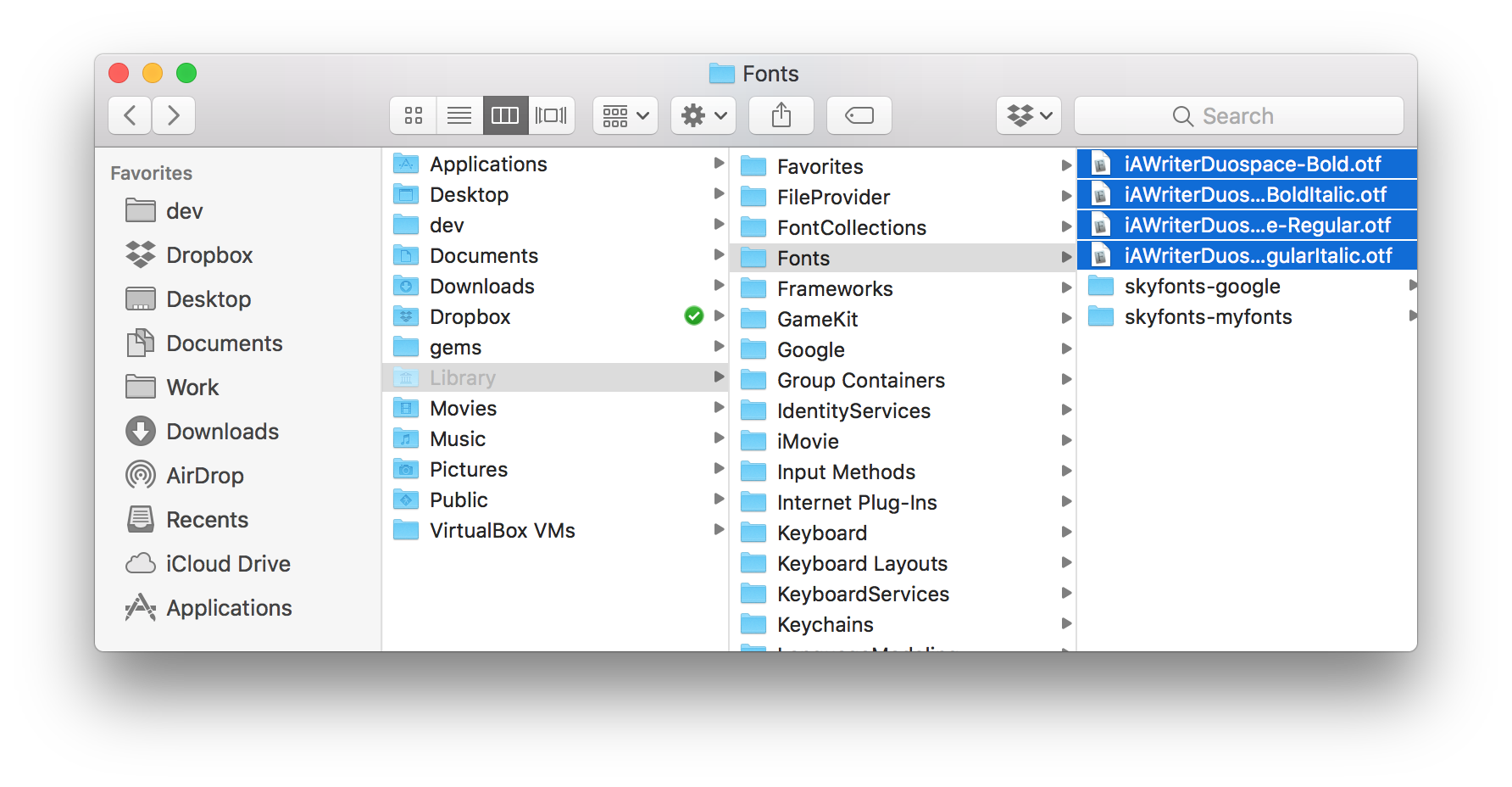
<p>It came to my attention recently that iA Writer has made their <a href="https://github.com/iaolo/iA-Fonts/tree/master/iA%20Writer%20Duospace">iA Writer Duospace</a> font available freely on GitHub.</p>

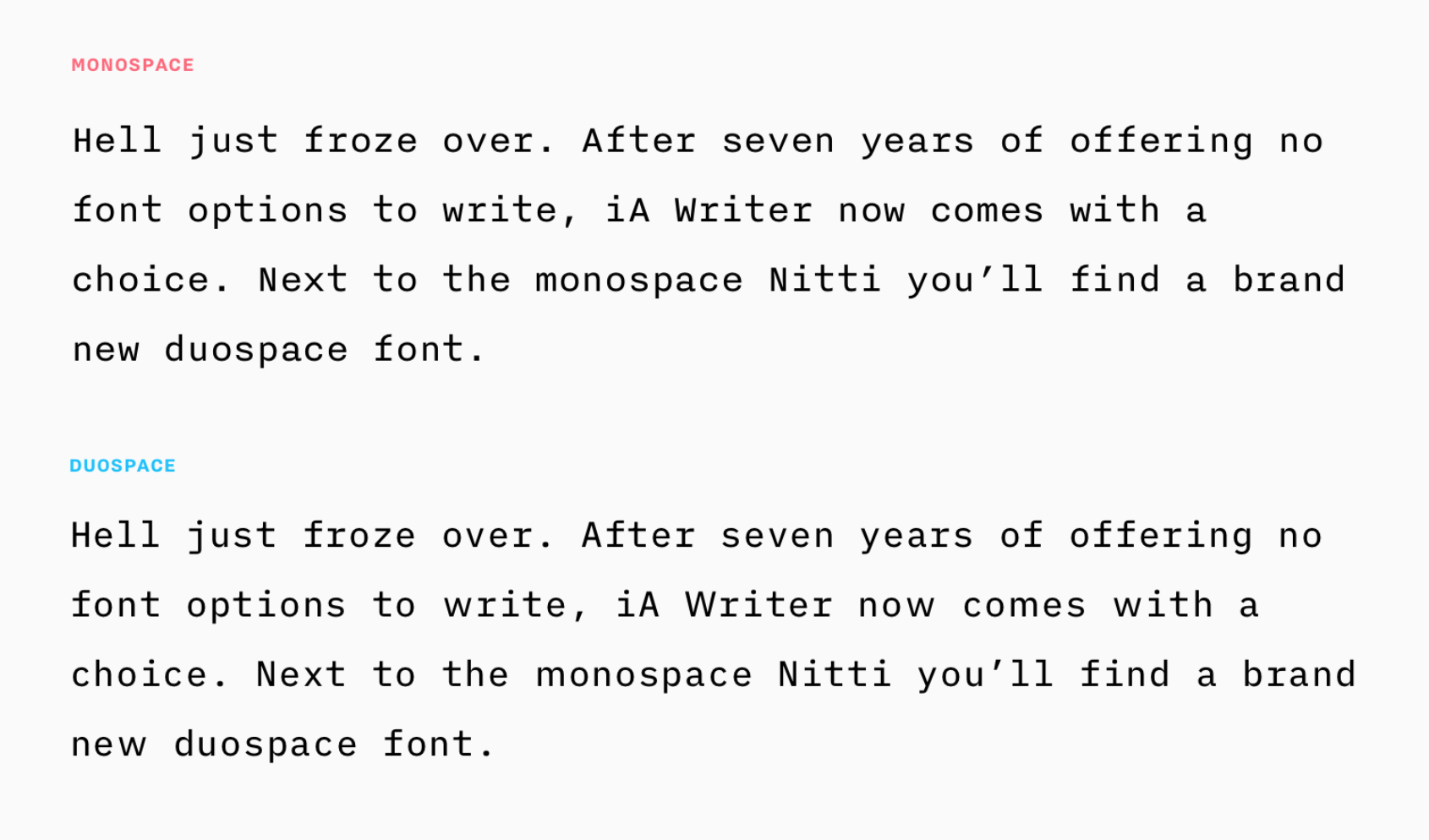
<p>This is a beautiful and practical font for composition, based loosely on the iconic open-source <a href="https://www.ibm.com/plex/">IBM Plex fontface</a>. It’s somewhere in between a monospace and proportional font:</p>

<p><img src="/assets/images/duo-vs-mono-font.PNG" alt="iA Duospace vs Monospace fonts" /></p>

<p>In theory, monospace fonts are best for composition because they force you to slow down when reading and have a “raw” look that suits the separation of content and presentation. In practice (and my opinion), monospace becomes sort of grating to look at for hours on end.</p>

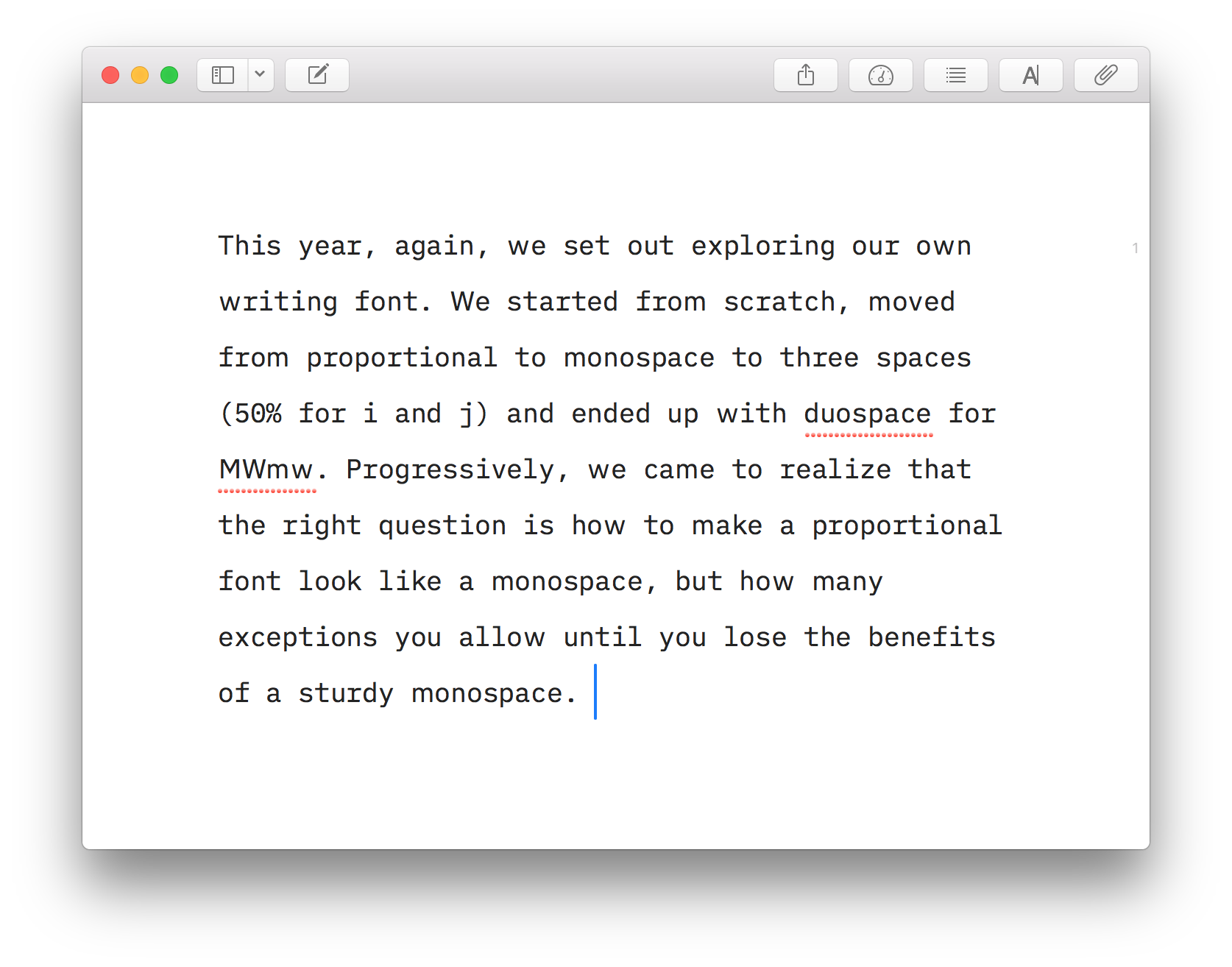
<p>If you like the aesthetic of iA Writer but prefer Ulysses for usability reasons, using the Duospace font in Ulysses will make it look almost identical:</p>

<p><img src="/assets/images/ulysses-duospace-white.PNG" alt="Ulysses with iA Writer Duospace font" /></p>

<p>All you have to do is add the iA Writer Duospace font as a system font on your Mac:</p>

<ol>
  <li><a href="https://github.com/iaolo/iA-Fonts/tree/master/iA%20Writer%20Duospace/OTF%20(Mac)">Download the font files (.otf) for Mac</a>.</li>
  <li>Open the <code class="language-plaintext highlighter-rouge">Go</code> menu option and hold down the Alt/Option key. The <code class="language-plaintext highlighter-rouge">Library</code> option will appear. This is hidden by default.</li>
  <li>Open the library folder, and navigate from <code class="language-plaintext highlighter-rouge">Library &gt; Fonts</code></li>
  <li>Drop all four .otf Duospace files into the folder. <img src="/assets/images/install-ia-writer font-mac.PNG" alt="Library" /></li>
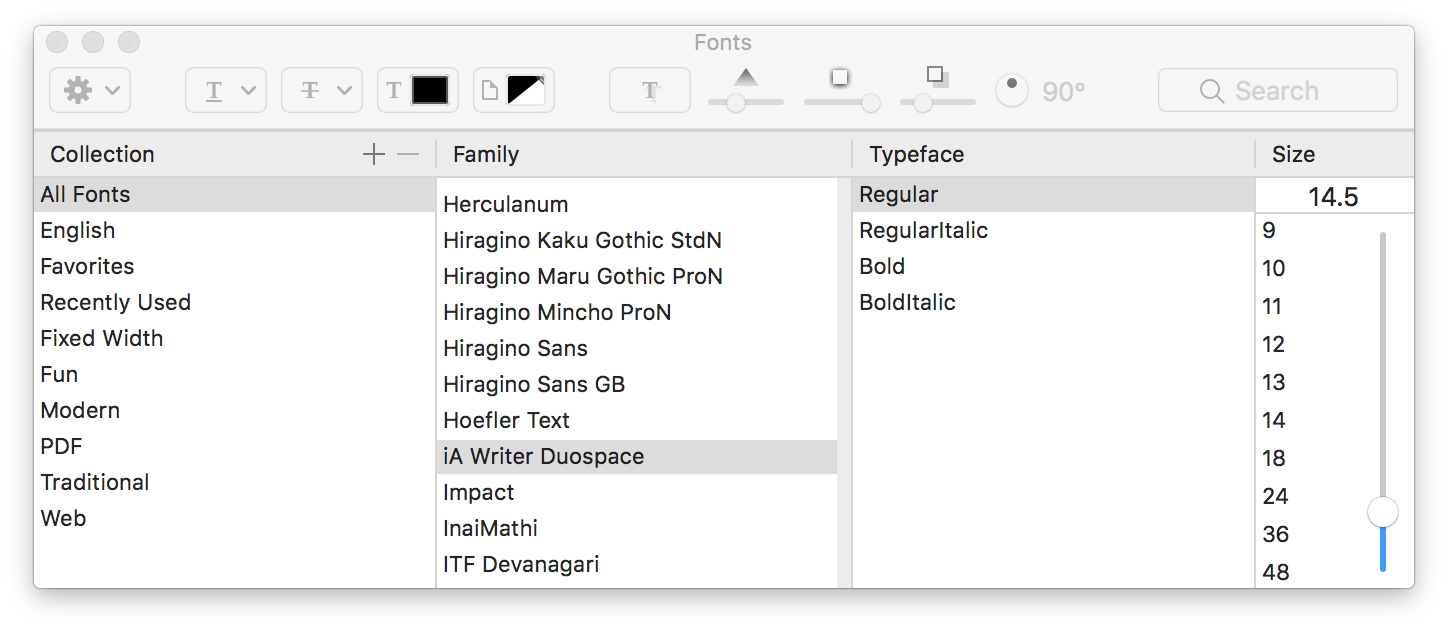
  <li>Open Ulysses and navigate to <code class="language-plaintext highlighter-rouge">Preferences &gt; General</code>, click the font button and select “Custom” at the bottom of the munu.</li>
  <li>Select iA Writer Duospace Regular. <img src="/assets/images/ia-writer-select-font.PNG" alt="Select font in Ulysses" /></li>
</ol>

<p>using the Yosemite Ulysses theme and the Duospace font, you should be left with a pleasant minimal workspace for composition that looks like iA Writer, but functions like Ulysses.</p>]]></content><author><name></name></author><category term="how-to" /><summary type="html"><![CDATA[Quick changes to make the writing app Ulysses look like iA Writer using the Duospace font.]]></summary></entry><entry><title type="html">A simple pdf embedding solution for Jekyll via Google Drive</title><link href="https://jamesonzimmer.com/simple-pdf-embed-for-jekyll/" rel="alternate" type="text/html" title="A simple pdf embedding solution for Jekyll via Google Drive" /><published>2015-07-02T00:00:00+00:00</published><updated>2015-07-02T00:00:00+00:00</updated><id>https://jamesonzimmer.com/embedding-pdfs-in-jekyll</id><content type="html" xml:base="https://jamesonzimmer.com/simple-pdf-embed-for-jekyll/"><![CDATA[<p>I recently did some digging trying to figure out a good solution for embedding pdfs on a Jekyll site. I was putting together a custom theme for a friend with an interesting set of requirements:</p>

<ul>
  <li>two post types: text, pdf</li>
  <li>multiple non-technical contributors</li>
  <li>prose.io CMS</li>
  <li>Github hosted</li>
</ul>

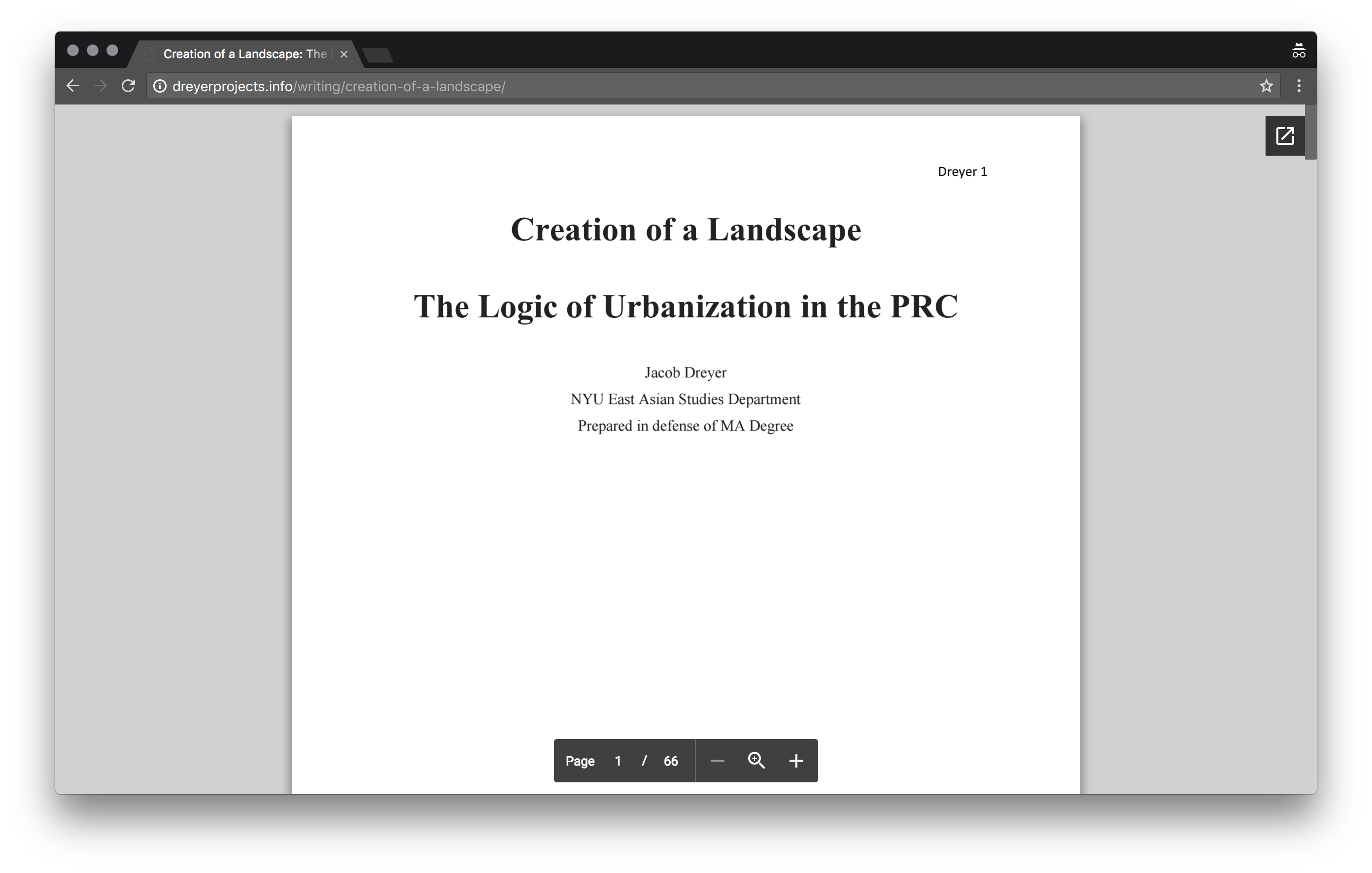
<p>The final solution I came up with results in a page that looks <a href="http://dreyerprojects.info/writing/creation-of-a-landscape/">like this</a>:</p>

<p><img src="/assets/images/dreyer-screenshot.png" alt="Dreyer PDF Jekyll" /></p>

<p>Because they would be updating via prose.io rather than a local machine, I needed a way to embed them from somewhere other than GitHub, which doesn’t seem really optimized for that sort of file anyway.</p>

<p>There are some services out there for this and among them <a href="http://issuu.com">Issuu</a> came closest to offering what we needed. However, their free tier injects ads into the iframe, and anyway all the features seemed like overkill for just displaying a pdf.</p>

<p>The best solution I could find was sort of a hack, embedding them as publicly shared files from Google Drive.</p>

<h2 id="setting-up-a-pdf-layout-in-jekyll">Setting up a pdf layout in Jekyll</h2>

<p>So first let’s set up a new layout, pdf.html, within _layouts:</p>

<script src="https://gist.github.com/jamesonzimmer/6c37fba1af7f26d8cb55f43b3171a5e7.js"></script>

<p>Note that if your CSS sets the <code class="language-plaintext highlighter-rouge">body</code> width to less than 100%, the embed won’t be full-screen like in my example.</p>

<h2 id="getting-the-embed-code-copying-and-pasting">Getting the embed code, copying and pasting</h2>

<p>The process is:</p>

<ol>
  <li>upload pdf to google drive</li>
  <li>make pdf public</li>
  <li>copy embed code</li>
  <li>paste into post</li>
  <li>change inline width and height values to 100%</li>
</ol>

<p>So once that’s set up, adding pdfs to the site is just a question of uploading to google docs and getting the embed code. The important thing here is to make sure the file’s sharing settings are set to “public”. Here’s a screencast showing where all the buttons are:</p>

<div class="video"><iframe width="100%" height="315" src="https://www.youtube.com/embed/vgip5h-o8KA?rel=0" frameborder="0" allowfullscreen=""></iframe></div>

<p>Drop that into your post, change the default <code class="language-plaintext highlighter-rouge">width</code> and <code class="language-plaintext highlighter-rouge">height</code> values to 100%, and you should have a file that looks something like this:</p>

<script src="https://gist.github.com/jamesonzimmer/ab3d5ba61796cd36dee2a97a61116562.js"></script>

<p>Perhaps there are more elegant solutions out there, but this is pretty straightforward, simple, free, and it works. Source available on <a href="https://github.com/jamesonzimmer/dreyerprojects.github.io">GitHub</a> if you’re curious.</p>

<p>I’m not super proud of this repository in hindsight, but have received some nice emails thanking me for this solution so figured I should leave it up as a public service.</p>]]></content><author><name></name></author><category term="how-to" /><summary type="html"><![CDATA[Instructions for a method of presenting PDFs on Jekyll site managed by prose.io]]></summary></entry></feed>